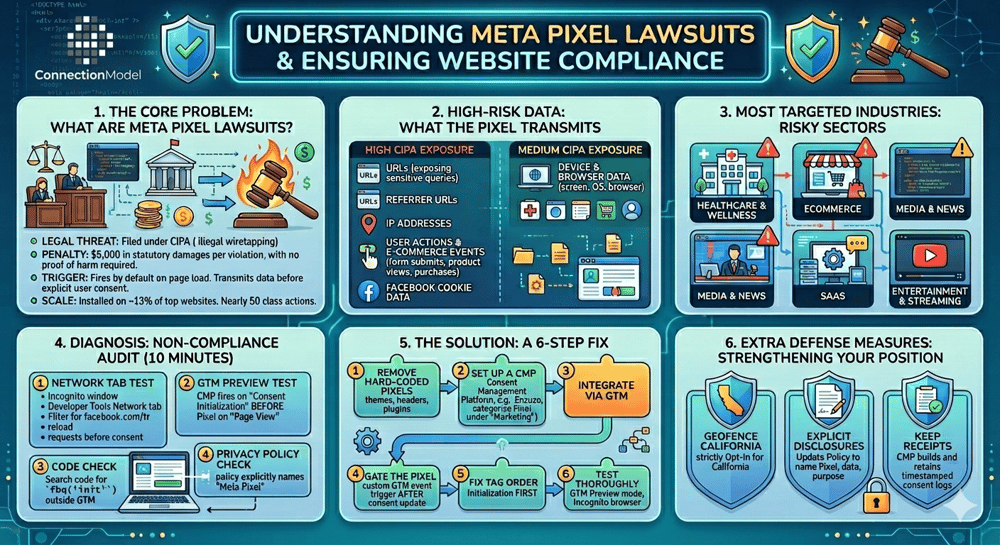
Meta Pixel lawsuits under California’s Invasion of Privacy Act (CIPA) are a fast-growing privacy litigation risk for websites in 2026. Plaintiffs’ firms are filing class actions at scale—nearly 50 documented cases so far—targeting sites that load the Meta Pixel (and similar tracking pixels) before obtaining user consent.
The stakes are unusually high: CIPA allows $5,000 in statutory damages per violation with no requirement to prove actual harm. Because the pixel fires automatically on page load and transmits data immediately, many sites are exposed to California visitors as soon as they land on the page.
If your site uses the Meta Pixel for advertising, retargeting, or conversion tracking—and you haven’t properly gated it behind consent—you could be one demand letter away from significant legal exposure. This is especially true for healthcare/wellness, ecommerce, media, SaaS, and entertainment sites, which appear most frequently in current litigation.
The good news? This is a solvable technical and governance problem. With the right consent management approach and Google Tag Manager (GTM) configuration, you can keep the performance benefits of the Meta Pixel while dramatically reducing (or eliminating) CIPA risk.
Here’s exactly what’s happening, how to diagnose your own site in about 10 minutes, and the practical 6-step fix most mid-market sites need.
The Meta Pixel is a small piece of JavaScript that loads on your site and immediately begins sending data back to Meta. It captures:
- Full page URLs (including sensitive search queries or health-related paths)
- Referrer URLs
- IP addresses
- User actions and ecommerce events (form submissions, product views, purchases)
- Facebook cookie data
Under CIPA, courts have treated the unauthorized “interception” of electronic communications - even on a website - as a potential violation when the data is captured and transmitted without consent. Because the pixel loads and beacons data before most consent banners even appear, the violation often occurs on the very first page view.
This isn’t theoretical. Plaintiffs have successfully pursued claims against sites in healthcare, ecommerce, media, and SaaS. The combination of easy-to-prove technical facts (pixel fires on load) + statutory damages + class action economics has made these cases attractive to the plaintiffs’ bar.
Simply having a privacy policy or a generic cookie banner is rarely enough. Courts and plaintiffs look for whether you obtained meaningful consent before tracking occurred and whether you honored browser signals like Global Privacy Control (GPC) where required under California law.
Before you spend money on consultants, run this simple audit yourself.
1. Network Tab Test (Incognito)
Open an incognito window, go to the Developer Tools → Network tab, filter for `facebook.com` or `fbq`, and reload the page. If you see requests to Meta before any consent interaction, you have a problem.
2. GTM Preview Test
Open Google Tag Manager in Preview mode. Trigger a page view. Check whether the Meta Pixel or any Facebook tag fires on the “Page View” or “Consent Initialization” trigger before a consent choice is made. If yes, it’s firing without consent.
3. Code Check
Search your site’s source code or GTM for `fbq(' init ') ' or `facebook.com/tr` outside of a properly configured consent-controlled tag. Hard-coded pixels in the `<head>` or theme files are a major red flag.
4. Privacy Policy Check
Does your policy explicitly name the Meta Pixel or Facebook/Meta tracking and describe what data it collects and shares? Vague “we use cookies for advertising” language is no longer sufficient.
If you fail any of these checks, especially the pre-consent firing tests, you have active CIPA exposure on every page load for California visitors and potentially others under similar state wiretap theories.
Rather than removing the Meta Pixel, the solution is to stop it from firing until you have valid consent and to implement proper technical guardrails. Here’s the proven sequence that works for most sites using GTM:
Delete any Meta Pixel code sitting directly in your theme, header, or plugins. All tracking should route through GTM to ensure central control.
Choose a Google-certified CMP that supports Consent Mode v2 and granular consent (Enzuzo is an excellent fit for most mid-market sites because of fast GTM integration, geo-targeting, and audit logging). Configure categories such as “Analytics,” “Advertising/Marketing,” and, if relevant, a higher-scrutiny category for sensitive or health-related data.
This is the most important technical step. The CMP script must load and establish consent state before any other tags fire. Use GTM’s built-in Consent Initialization trigger to keep the sequence clear.
In GTM, set default consent states to `denied` for `ad_storage`, `ad_user_data`, and `ad_personalization`. Then configure the Meta Pixel tag (or any Facebook conversion tag) to fire only after the user grants the Advertising/Marketing consent category. Use the CMP’s consent update callback or a custom event listener.
Nothing that sends data to Meta or any third party should fire before the CMP has run and the user has made a choice, or a valid GPC signal has been processed. Test this ruthlessly in GTM Preview.
Use incognito mode, the Network tab, GTM Preview, and a GPC-enabled browser such as Firefox with an extension or Brave. Confirm the pixel only fires after explicit consent or proper GPC handling, and that consent choices are logged with timestamps.
When done correctly, you keep the advertising and measurement value of the Meta Pixel while creating a strong compliance posture.
Fixing the Meta Pixel in isolation is a good start, but sophisticated plaintiffs and regulators look at the entire tracking stack. Session replay tools, chat widgets, other ad pixels, and any technology that records user behavior before consent create similar risks.
A modern consent program also helps with:
- California CPRA requirements (honoring GPC, “Do Not Sell or Share,” and “Limit Sensitive Personal Information”)
- Washington My Health My Data Act risks on health-related pages (explicit opt-in before collecting or sharing consumer health data)
- Overall defensibility through timestamped consent logs and audit trails
The sites that win these cases (or avoid them) treat consent as a governed technical control, not just a marketing banner.
Most companies only discover their exposure after receiving a letter from plaintiffs’ counsel. By then you’re already in reactive mode.
In about 20 minutes on a call, our team will:
This assessment is designed for marketing, analytics, and compliance stakeholders who want clarity without a big upfront commitment.
You’ll leave the call with a clear picture of where you stand and exactly what to do next - whether that’s a quick GTM configuration fix or a broader consent management project.
Meta Pixel lawsuits aren’t going away, but the technical path to compliance is well understood and achievable for most sites. The companies that act now will protect themselves from statutory damages and class actions while maintaining (or even improving) their advertising performance by properly implementing Consent Mode.
If your site uses the Meta Pixel - or any third-party tracking - and you haven’t recently audited consent sequencing in GTM, now is the time to act. The cost of prevention is dramatically lower than the cost of litigation.
The AI search shift is not coming… It’s already here.
A local service business adds the llms.txt file and Facts page. Within weeks, ChatGPT starts citing them correctly instead of making up details. An e-commerce brand turns on AI referral tracking and discovers Perplexity drives 40% of their new AI traffic with 18X conversion. They double down on the content types that the model prefers and see revenue from AI sources jump.
A B2B company launches the custom chatbot on its site. It now handles 80% of routine questions at night and on weekends, freeing the sales team for higher-value calls.
None of these outcomes required a full website rebuild. Each one came from one or two targeted services inside the same connected suite.
The AI search shift is not coming… It’s already here. Brands that treat it as a technical checkbox fall behind. Brands that treat it as a complete visibility system pull ahead.
If you want to see exactly where your brand stands today inside the major AI models and what it would take to fix the gaps, book a 30-minute discovery call. We will run a quick audit, show you the current citations (or lack of them), and map the highest-impact next steps.
No hard sell. Just clear data and a plan that matches your budget and timeline.
Schedule a discovery call at connectionmodel.com or directly here: Schedule a Meeting
Your customers are already asking AI about the products and services you sell. Let’s make sure the answer includes you.
Connect On Social
Connection Model
What is a Digital Marketing Agency
What is Inbound Marketing?
What is Search Marketing Equity® ?
What is Organic SEO?
HubSpot Certified Partner Agency
How Fast PageSpeed improves SEO
Social Media Marketing
Search Everywhere Optimization
Brand Photography
AI-Based Website Revenue Agents
Preventing Digital Marketing Fraud
How to get the most from our PPC Agency
Competitor Analysis & Market Assessment
Boosting Search Visibility with Content Optimization
Proper use of AI in Content Marketing
Connection Model has 7 reviews with an average rating of 5.0 stars on a 5.0 scale.
Third-Party Source: Birdeye
From The Blog